
 Gerald Lonlas
70d1511f73
Gerald Lonlas
70d1511f73
|
8 years ago | |
|---|---|---|
| .github | 8 years ago | |
| bin | 8 years ago | |
| docs | 8 years ago | |
| freqtrade | 8 years ago | |
| scripts | 8 years ago | |
| .coveragerc | 8 years ago | |
| .dockerignore | 8 years ago | |
| .gitignore | 8 years ago | |
| .pylintrc | 8 years ago | |
| .travis.yml | 8 years ago | |
| CONTRIBUTING.md | 8 years ago | |
| Dockerfile | 8 years ago | |
| LICENSE | 9 years ago | |
| MANIFEST.in | 8 years ago | |
| README.md | 8 years ago | |
| config.json.example | 8 years ago | |
| freqtrade.service | 8 years ago | |
| install_ta-lib.sh | 8 years ago | |
| requirements.txt | 8 years ago | |
| setup.cfg | 8 years ago | |
| setup.py | 8 years ago | |
README.md
freqtrade


Simple High frequency trading bot for crypto currencies designed to support multi exchanges and be controlled via Telegram.
Disclaimer
This software is for educational purposes only. Do not risk money which you are afraid to lose. USE THE SOFTWARE AT YOUR OWN RISK. THE AUTHORS AND ALL AFFILIATES ASSUME NO RESPONSIBILITY FOR YOUR TRADING RESULTS.
Always start by running a trading bot in Dry-run and do not engage money before you understand how it works and what profit/loss you should expect.
We strongly recommend you to have coding and Python knowledge. Do not hesitate to read the source code and understand the mechanism of this bot.
Table of Contents
Branches
The project is currently setup in two main branches:
develop- This branch has often new features, but might also cause breaking changes.master- This branch contains the latest stable release. The bot 'should' be stable on this branch, and is generally well tested.
Features
- Based on Python 3.6+: For botting on any operating system - Windows, macOS and Linux
- Persistence: Persistence is achieved through sqlite
- Dry-run: Run the bot without playing money.
- Backtesting: Run a simulation of your buy/sell strategy.
- Strategy Optimization: Optimize your buy/sell strategy parameters with Hyperopts.
- Whitelist crypto-currencies: Select which crypto-currency you want to trade.
- Blacklist crypto-currencies: Select which crypto-currency you want to avoid.
- Manageable via Telegram: Manage the bot with Telegram
- Display profit/loss in fiat: Display your profit/loss in 33 fiat.
- Daily summary of profit/loss: Provide a daily summary of your profit/loss.
- Performance status report: Provide a performance status of your current trades.
Exchange supported
- Bittrex
- [ ] Binance
- Others
Quick start
This quick start section is a very short explanation on how to test the bot in dry-run. We invite you to read the bot documentation to ensure you understand how the bot is working.
The following steps are made for Linux/MacOS environment
1. Clone the repo
git clone git@github.com:gcarq/freqtrade.git
git checkout develop
cd freqtrade
2. Create the config file
Switch "dry_run": true,
cp config.json.example config.json
vi config.json
3. Build your docker image and run it
docker build -t freqtrade .
docker run --rm -v `pwd`/config.json:/freqtrade/config.json -it freqtrade
Help / Slack
For any questions not covered by the documentation or for further information about the bot, we encourage you to join our slack channel.
Bugs / Issues
If you discover a bug in the bot, please search our issue tracker first. If it hasn't been reported, please create a new issue and ensure you follow the template guide so that our team can assist you as quickly as possible.
Feature Requests
Have you a great idea to improve the bot you want to share? Please, first search if this feature was not already discussed. If it hasn't been requested, please create a new request and ensure you follow the template guide so that it does not get lost in the bug reports.
Pull Requests
Feel like our bot is missing a feature? We welcome your pull requests! Please read our Contributing document to understand the requirements before sending your pull-requests.
Important: Always create your PR against the develop branch, not
master.
Basic Usage
Bot commands
usage: main.py [-h] [-c PATH] [-v] [--version] [--dynamic-whitelist [INT]]
               [--dry-run-db]
               {backtesting,hyperopt} ...

Simple High Frequency Trading Bot for crypto currencies

positional arguments:
  {backtesting,hyperopt}
    backtesting         backtesting module
    hyperopt            hyperopt module

optional arguments:
  -h, --help            show this help message and exit
  -c PATH, --config PATH
                        specify configuration file (default: config.json)
  -v, --verbose         be verbose
  --version             show program's version number and exit
  --dynamic-whitelist [INT]
                        dynamically generate and update whitelist based on 24h
                        BaseVolume (Default 20 currencies)
  --dry-run-db          Force dry run to use a local DB
                        "tradesv3.dry_run.sqlite" instead of memory DB. Work
                        only if dry_run is enabled.
More details on:
Telegram RPC commands
Telegram is not mandatory. However, this is a great way to control your bot. More details on our documentation
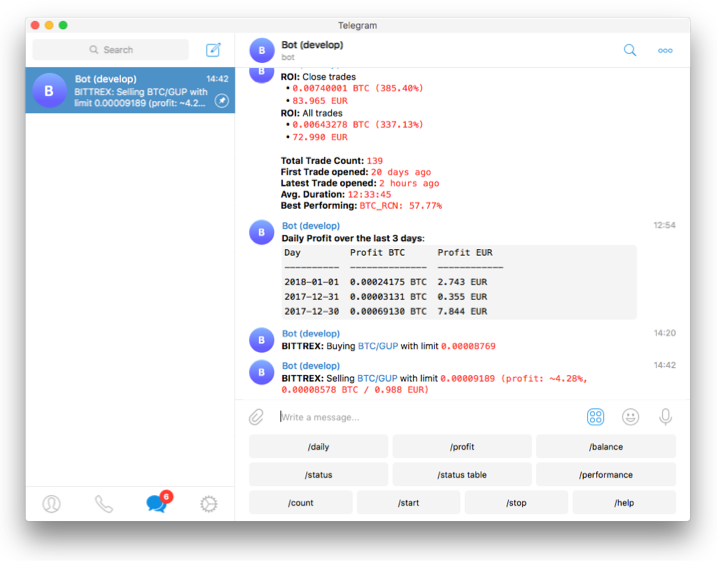
/start: Starts the trader/stop: Stops the trader/status [table]: Lists all open trades/count: Displays number of open trades/profit: Lists cumulative profit from all finished trades/forcesell <trade_id>|all: Instantly sells the given trade (Ignoringminimum_roi)./performance: Show performance of each finished trade grouped by pair/balance: Show account balance per currency/daily <n>: Shows profit or loss per day, over the last n days/help: Show help message/version: Show version
Requirements
Min hardware required
To run this bot we recommend you a cloud instance with a minimum of:
- Minimal (advised) system requirements: 2GB RAM, 1GB disk space, 2vCPU
Software requirements
- Python 3.6.x
- pip
- git
- TA-Lib
- virtualenv (Recommended)
- Docker (Recommended)