
 dependabot[bot]
README.md



Freqtrade is a free and open source crypto trading bot written in Python. It is designed to support all major exchanges and be controlled via Telegram. It contains backtesting, plotting and money management tools as well as strategy optimization by machine learning.
Disclaimer
This software is for educational purposes only. Do not risk money which you are afraid to lose. USE THE SOFTWARE AT YOUR OWN RISK. THE AUTHORS AND ALL AFFILIATES ASSUME NO RESPONSIBILITY FOR YOUR TRADING RESULTS.
Always start by running a trading bot in Dry-run and do not engage money before you understand how it works and what profit/loss you should expect.
We strongly recommend you to have coding and Python knowledge. Do not hesitate to read the source code and understand the mechanism of this bot.
Supported Exchange marketplaces
Please read the exchange specific notes to learn about eventual, special configurations needed for each exchange.
- Bittrex
- Binance (*Note for binance users)
- Kraken
- FTX
- potentially many others. (We cannot guarantee they will work)
Community tested
Exchanges confirmed working by the community:
Documentation
We invite you to read the bot documentation to ensure you understand how the bot is working.
Please find the complete documentation on our website.
Features
- Based on Python 3.7+: For botting on any operating system - Windows, macOS and Linux.
- Persistence: Persistence is achieved through sqlite.
- Dry-run: Run the bot without paying money.
- Backtesting: Run a simulation of your buy/sell strategy.
- Strategy Optimization by machine learning: Use machine learning to optimize your buy/sell strategy parameters with real exchange data.
- Edge position sizing Calculate your win rate, risk reward ratio, the best stoploss and adjust your position size before taking a position for each specific market. Learn more.
- Whitelist crypto-currencies: Select which crypto-currency you want to trade or use dynamic whitelists.
- Blacklist crypto-currencies: Select which crypto-currency you want to avoid.
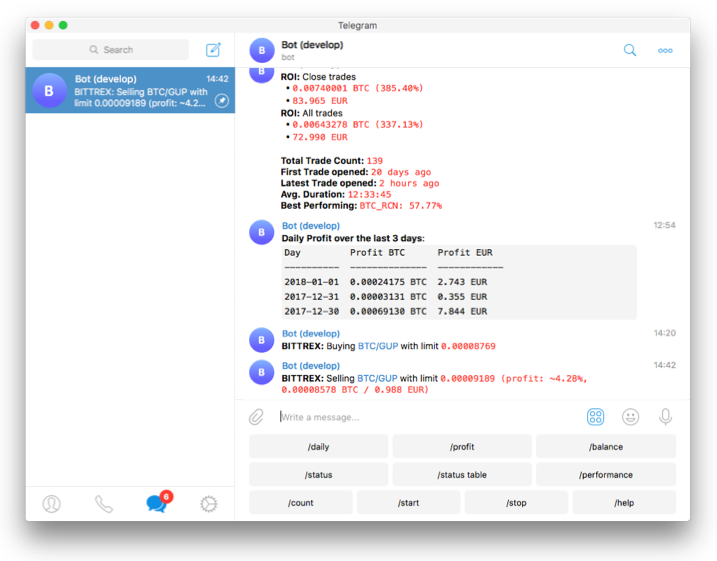
- Manageable via Telegram: Manage the bot with Telegram.
- Display profit/loss in fiat: Display your profit/loss in 33 fiat.
- Daily summary of profit/loss: Provide a daily summary of your profit/loss.
- Performance status report: Provide a performance status of your current trades.
Quick start
Freqtrade provides a Linux/macOS script to install all dependencies and help you to configure the bot.
git clone -b develop https://github.com/freqtrade/freqtrade.git
cd freqtrade
./setup.sh --install
For any other type of installation please refer to Installation doc.
Basic Usage
Bot commands
usage: freqtrade [-h] [-V]
                 {trade,create-userdir,new-config,new-hyperopt,new-strategy,download-data,convert-data,convert-trade-data,backtesting,edge,hyperopt,hyperopt-list,hyperopt-show,list-exchanges,list-hyperopts,list-markets,list-pairs,list-strategies,list-timeframes,show-trades,test-pairlist,plot-dataframe,plot-profit}
                 ...

Free, open source crypto trading bot

positional arguments:
  {trade,create-userdir,new-config,new-hyperopt,new-strategy,download-data,convert-data,convert-trade-data,backtesting,edge,hyperopt,hyperopt-list,hyperopt-show,list-exchanges,list-hyperopts,list-markets,list-pairs,list-strategies,list-timeframes,show-trades,test-pairlist,plot-dataframe,plot-profit}
    trade               Trade module.
    create-userdir      Create user-data directory.
    new-config          Create new config
    new-hyperopt        Create new hyperopt
    new-strategy        Create new strategy
    download-data       Download backtesting data.
    convert-data        Convert candle (OHLCV) data from one format to
                        another.
    convert-trade-data  Convert trade data from one format to another.
    backtesting         Backtesting module.
    edge                Edge module.
    hyperopt            Hyperopt module.
    hyperopt-list       List Hyperopt results
    hyperopt-show       Show details of Hyperopt results
    list-exchanges      Print available exchanges.
    list-hyperopts      Print available hyperopt classes.
    list-markets        Print markets on exchange.
    list-pairs          Print pairs on exchange.
    list-strategies     Print available strategies.
    list-timeframes     Print available timeframes for the exchange.
    show-trades         Show trades.
    test-pairlist       Test your pairlist configuration.
    plot-dataframe      Plot candles with indicators.
    plot-profit         Generate plot showing profits.

optional arguments:
  -h, --help            show this help message and exit
  -V, --version         show program's version number and exit
Telegram RPC commands
Telegram is not mandatory. However, this is a great way to control your bot. More details and the full command list on our documentation
/start: Starts the trader./stop: Stops the trader./stopbuy: Stop entering new trades./status <trade_id>|[table]: Lists all or specific open trades./profit [<n>]: Lists cumulative profit from all finished trades, over the last n days./forcesell <trade_id>|all: Instantly sells the given trade (Ignoringminimum_roi)./performance: Show performance of each finished trade grouped by pair/balance: Show account balance per currency./daily <n>: Shows profit or loss per day, over the last n days./help: Show help message./version: Show version.
Development branches
The project is currently setup in two main branches:
develop- This branch has often new features, but might also contain breaking changes. We try hard to keep this branch as stable as possible.stable- This branch contains the latest stable release. This branch is generally well tested.feat/*- These are feature branches, which are being worked on heavily. Please don't use these unless you want to test a specific feature.
Support
Help / Discord / Slack
For any questions not covered by the documentation or for further information about the bot, or to simply engage with like-minded individuals, we encourage you to join our slack channel.
Please check out our discord server.
You can also join our Slack channel.
Bugs / Issues
If you discover a bug in the bot, please search our issue tracker first. If it hasn't been reported, please create a new issue and ensure you follow the template guide so that our team can assist you as quickly as possible.
Feature Requests
Have you a great idea to improve the bot you want to share? Please, first search if this feature was not already discussed. If it hasn't been requested, please create a new request and ensure you follow the template guide so that it does not get lost in the bug reports.
Pull Requests
Feel like our bot is missing a feature? We welcome your pull requests!
Please read our Contributing document to understand the requirements before sending your pull-requests.
Coding is not a necessity to contribute - maybe start with improving our documentation? Issues labeled good first issue can be good first contributions, and will help get you familiar with the codebase.
Note before starting any major new feature work, please open an issue describing what you are planning to do or talk to us on discord or Slack. This will ensure that interested parties can give valuable feedback on the feature, and let others know that you are working on it.
Important: Always create your PR against the develop branch, not stable.
Requirements
Up-to-date clock
The clock must be accurate, synchronized to a NTP server very frequently to avoid problems with communication to the exchanges.
Min hardware required
To run this bot we recommend you a cloud instance with a minimum of:
- Minimal (advised) system requirements: 2GB RAM, 1GB disk space, 2vCPU
Software requirements
- Python 3.7.x
- pip
- git
- TA-Lib
- virtualenv (Recommended)
- Docker (Recommended)