
 BoulderBadgeDad
7b3a927e86
BoulderBadgeDad
7b3a927e86
|
15 hours ago | |
|---|---|---|
| .github/workflows | 15 hours ago | |
| Support | 1 month ago | |
| api | 5 days ago | |
| assets | 2 months ago | |
| config | 4 days ago | |
| core | 16 hours ago | |
| database | 4 days ago | |
| docs | 2 days ago | |
| scripts | 1 month ago | |
| services | 2 weeks ago | |
| templates | 3 months ago | |
| tests | 17 hours ago | |
| tools | 6 days ago | |
| utils | 1 month ago | |
| webui | 15 hours ago | |
| .dockerignore | 2 weeks ago | |
| .gitattributes | 7 months ago | |
| .gitignore | 5 days ago | |
| Dockerfile | 5 days ago | |
| README.md | 5 days ago | |
| advanced_settings_screenshot.png | 3 months ago | |
| beatport_unified_scraper.py | 3 weeks ago | |
| dev.py | 2 weeks ago | |
| dev.sh | 2 weeks ago | |
| docker-compose.yml | 5 days ago | |
| entrypoint.sh | 5 days ago | |
| gunicorn.conf.py | 1 month ago | |
| gunicorn.dev.conf.py | 2 weeks ago | |
| license.txt | 9 months ago | |
| pr_description.md | 4 days ago | |
| pyproject.toml | 3 weeks ago | |
| requirements-dev.txt | 3 weeks ago | |
| requirements.txt | 3 weeks ago | |
| web_server.py | 15 hours ago | |
| wsgi.py | 1 month ago | |

README.md

SoulSync - Intelligent Music Discovery & Automation Platform
Spotify-quality music discovery for self-hosted libraries. Automates downloads, curates playlists, monitors artists, and organizes your collection with zero manual effort.
IMPORTANT: Configure file sharing in slskd to avoid Soulseek bans. Set up shared folders at
http://localhost:5030/shares.
Community: Discord | Website: ssync.net | Support: GitHub Issues | Donate: Ko-fi
What It Does
SoulSync bridges streaming services to your music library with automated discovery:
- Monitors artists → Automatically detects new releases from your watchlist
- Generates playlists → Release Radar, Discovery Weekly, Seasonal, Decade/Genre mixes, Cache-powered discovery
- Downloads missing tracks → From Soulseek, Deezer, Tidal, Qobuz, HiFi, YouTube, or any combination via Hybrid mode
- Verifies downloads → AcoustID fingerprinting for all download sources
- Enriches metadata → 10 enrichment workers (Spotify, MusicBrainz, iTunes, Deezer, Discogs, AudioDB, Last.fm, Genius, Tidal, Qobuz)
- Tags consistently → Picard-style MusicBrainz release preflight ensures all album tracks get the same release ID
- Organizes files → Custom templates for clean folder structures
- Manages library → Plex, Jellyfin, Navidrome, or SoulSync Standalone (no media server required)
- Scrobbles plays → Automatic scrobbling to Last.fm and ListenBrainz from your media server
Key Features
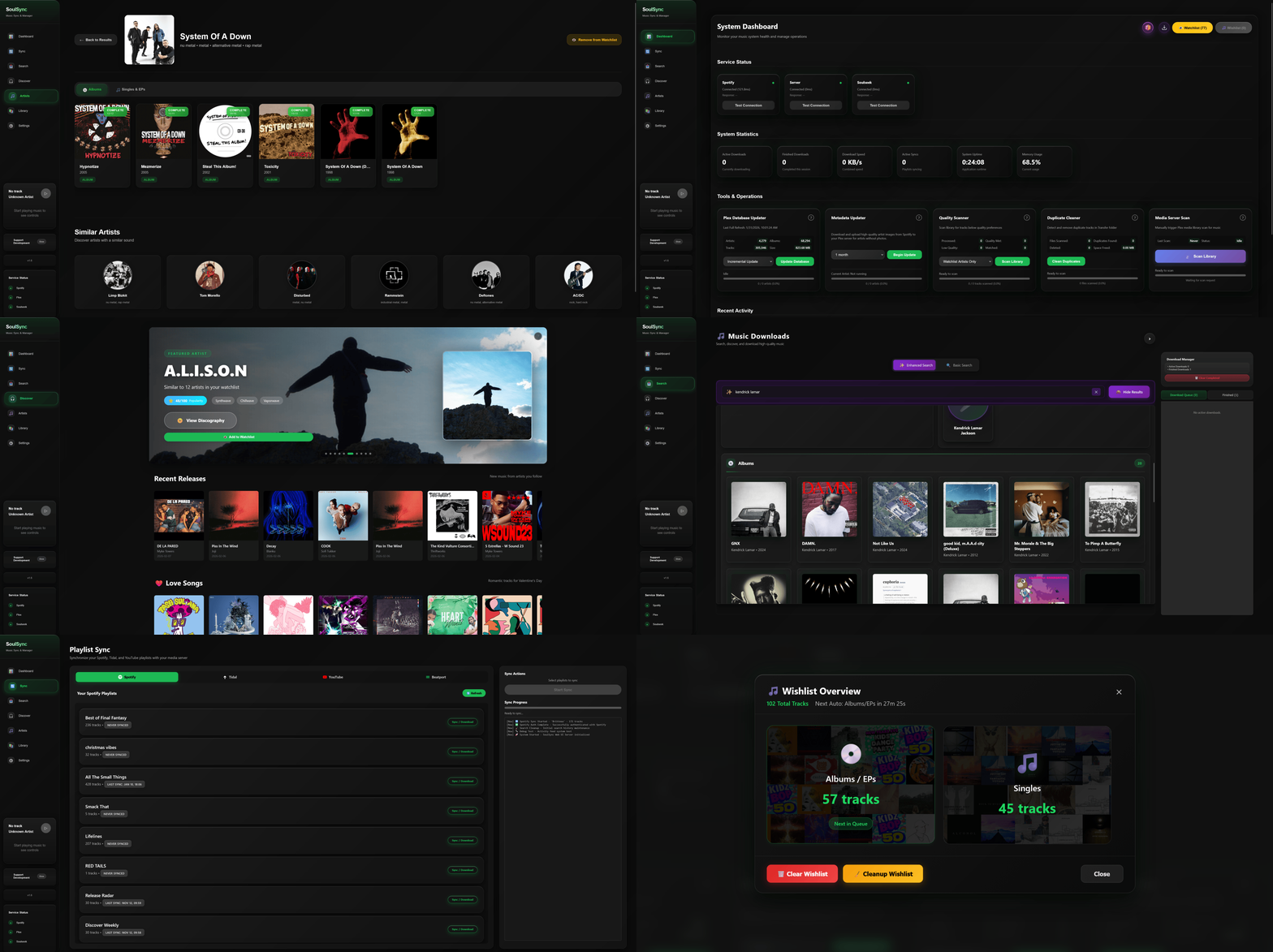
Discovery Engine
Release Radar — New tracks from watchlist artists, personalized by listening history
Discovery Weekly — 50 tracks from similar artists with serendipity weighting
Seasonal Playlists — Halloween, Christmas, Valentine's, Summer, Spring, Autumn (hemisphere-aware)
Personalized Playlists (12+ types)
- Recently Added, Top Tracks, Forgotten Favorites
- Decade Playlists (1960s-2020s), Genre Playlists (15+ categories)
- Because You Listen To, Daily Mixes, Hidden Gems, Popular Picks, Discovery Shuffle, Familiar Favorites
- Custom Playlist Builder (1-5 seed artists → similar artists → random albums → shuffled tracks)
Cache-Powered Discovery (zero API calls)
- Undiscovered Albums — albums by your most-played artists that aren't in your library
- New In Your Genres — recently released albums matching your top genres
- From Your Labels — popular albums on labels already in your library
- Deep Cuts — low-popularity tracks from artists you listen to
- Genre Explorer — genre landscape pills with artist counts, tap for Genre Deep Dive modal
ListenBrainz — Import recommendation and community playlists
Beatport — Full electronic music integration with genre browser (39+ genres)
Multi-Source Downloads
6 Download Sources: Soulseek, Deezer, Tidal, Qobuz, HiFi, YouTube — use any single source or Hybrid mode with drag-to-reorder priority
Deezer Downloads — ARL token authentication, FLAC lossless / MP3 320 / MP3 128 with automatic quality fallback and Blowfish decryption
Tidal Downloads — Device-flow OAuth, quality tiers from AAC 96kbps to FLAC 24-bit/96kHz Hi-Res
Qobuz Downloads — Email/password auth, quality up to Hi-Res Max (FLAC 24-bit/192kHz)
HiFi Downloads — Free lossless via public API instances, no account required
Soulseek — FLAC priority with quality profiles, peer quality scoring, source reuse for album consistency
YouTube — Audio extraction with cookie-based bot detection bypass
Hybrid Mode — Enable any combination of sources, drag to set priority order, automatic fallback chain
Playlist Sources: Spotify, Tidal, YouTube, Deezer, Beatport charts, ListenBrainz, Spotify Link (no API needed)
Post-Download
- Lossy copy creation: MP3, Opus, AAC with configurable bitrate (Opus capped at 256kbps)
- Hi-Res FLAC downsampling to 16-bit/44.1kHz CD quality
- Blasphemy Mode — delete original FLAC after conversion
- Synchronized lyrics (LRC) via LRClib
- ReplayGain analysis — optional track-level loudness tagging via ffmpeg, runs before lossy copy so both files get tagged
- Picard-style album consistency — pre-flight MusicBrainz release lookup ensures all tracks get the same release ID
Listening Stats & Scrobbling
Listening Stats Page — Full dashboard with Chart.js visualizations
- Overview cards: total plays, listening time, unique artists/albums/tracks
- Timeline bar chart, genre breakdown donut with legend
- Top artists visual bubbles, top albums and tracks with play buttons and cover art
- Library health: format breakdown bar, enrichment coverage rings, database storage chart
- Time range filters: 7 days, 30 days, 12 months, all time
Scrobbling — Automatic Last.fm and ListenBrainz scrobbling from Plex, Jellyfin, or Navidrome
Audio Verification
AcoustID Fingerprinting (optional) — Verifies downloaded files match expected tracks
- Runs for all download sources (Soulseek, Tidal, Qobuz, HiFi, Deezer, YouTube)
- Catches wrong versions (live, remix, cover) even from streaming API sources
- Fail-open design: verification errors never block downloads
Metadata & Enrichment
10 Background Enrichment Workers: Spotify, MusicBrainz, iTunes, Deezer, Discogs, AudioDB, Last.fm, Genius, Tidal, Qobuz
- Each worker independently processes artists, albums, and tracks
- Pause/resume controls on dashboard, auto-pause during database scans
- Error items don't auto-retry in infinite loops (fixed in v2.1)
Multi-Source Metadata
- Primary source selectable: Spotify, iTunes/Apple Music, Deezer, or Discogs
- Spotify no longer auto-overrides — user chooses their preferred source in Settings
- Spotify auth still enables playlists, followed artists, and enrichment
- MusicBrainz enrichment with Picard-style album consistency
Hydrabase (optional P2P metadata network) — replaces iTunes as the metadata source when connected. Federated lookup with community-matched results, falls back automatically if disconnected. Dev-mode feature, enable in Settings → Connections.
Genre Whitelist — filter junk genre tags (artist names, radio show names, playlist names) from all 10 enrichment sources. 272 curated default genres, fully customizable. Off by default for backward compatibility.
Post-Processing Tag Embedding
- Granular per-service tag toggles (18+ MusicBrainz tags, Spotify/iTunes/Deezer IDs, AudioDB mood/style, Tidal/Qobuz ISRCs, Last.fm tags, Genius URLs)
- Multi-artist tagging options: configurable separator (comma/semicolon/slash), multi-value ARTISTS tag for Navidrome/Jellyfin multi-artist linking, optional "move featured artists to title" mode
- Album art embedding, cover.jpg download
- Spotify rate limit protection across all API calls
Advanced Matching Engine
- Version-aware matching: strictly rejects remixes when you want the original (and vice versa)
- Unicode and accent handling (KoЯn, Bjork, A$AP Rocky)
- Fuzzy matching with weighted confidence scoring (title, artist, duration)
- Album variation detection (Deluxe, Remastered, Taylor's Version, etc.)
- Streaming source match validation: same confidence scoring applied to Tidal/Qobuz/HiFi/Deezer results as Soulseek
- Short title protection: prevents "Love" from matching "Loveless"
Automation
Automation Engine — Visual drag-and-drop builder for custom workflows
- Triggers: Schedule, Daily/Weekly Time, Track Downloaded, Batch Complete, Playlist Changed, Discovery Complete, Signal Received, Library Scan Complete, Watchlist Match, Wishlist Item Added, and more
- Actions: Process Wishlist, Scan Watchlist, Refresh Mirrored, Discover Playlist, Sync Playlist, Scan Library, Database Update, Quality Scan, Full Cleanup, and 10+ more
- Then Actions (up to 3 per automation): Fire Signal (chain to other automations), Discord/Telegram/Pushbullet notifications, audible chimes
- Signal Chains — One automation fires
signal:foo, another listens for it. Cycle detection + chain depth limit + cooldown prevent runaway chains. - Playlist Pipeline — Single automation for full playlist lifecycle: refresh → discover → sync → download missing. No manual signal wiring.
- Pipelines — Pre-built one-click deployments (New Music, Nightly Operations, Full Library Maintenance, etc.) that install a linked group of automations at once
- Automation Groups — Drag-and-drop organization, bulk enable/disable, rename, right-click context menus
Watchlist — Monitor unlimited artists with per-artist configuration
- Release type filters: Albums, EPs, Singles
- Content filters: Live, Remixes, Acoustic, Compilations
- Auto-discover similar artists, periodic scanning
Wishlist — Failed downloads automatically queued for retry with auto-processing
Mirrored Playlists — Mirror from Spotify, Tidal, YouTube, Deezer and keep synced
- Auto-refresh detects source changes via URL/ID tracking in playlist metadata
- Discovery pipeline matches source tracks to user's primary metadata source (Spotify/iTunes/Deezer/Discogs)
- Auto Wing It fallback — tracks that fail all metadata APIs get stub metadata from the raw source title and flow through the normal download pipeline anyway
- Followed Spotify playlists that hit 403 errors fall back to public embed scraper
- Unmatch button on found tracks with DB persistence for mirrored playlists
Local Profiles — Multiple configuration profiles with isolated settings, watchlists, and playlists
Library Management
Dashboard — Service status, system stats, activity feed, enrichment worker controls
- Unified glass UI design across all tool cards, service cards, and stat cards
Library Page — Artist grid with staggered card animations, per-artist enrichment coverage rings
- Artist Radio button — play random track with auto-queue radio mode
- Play buttons on Last.fm top tracks sidebar
Enhanced Library Manager — Toggle between Standard and Enhanced views
- Inline metadata editing, per-service manual matching
- Write Tags to File (MP3/FLAC/OGG/M4A), tag preview with diff
- Server sync after tag writes (Plex, Jellyfin, Navidrome)
- Bulk operations, sortable columns, multi-disc support
Library Maintenance — 10+ automated repair jobs
- Track Number, Dead Files, Duplicates, Metadata Gaps, Album Completeness, Missing Cover Art, AcoustID Scanner, Orphan Files, Fake Lossless, Library Reorganize, Lossy Converter, MBID Mismatch, Album Tag Consistency, Live/Commentary Cleaner
- Enrichment workers auto-pause during database scans
- One-click Fix All with findings dashboard
Database Storage Visualization — Donut chart showing per-table storage breakdown
Live Log Viewer — Real-time terminal-style log viewer on Settings → Logs. Color-coded levels (DEBUG/INFO/WARNING/ERROR), live filter + search, switch between log files (app, post-processing, AcoustID, source reuse). Auto-scroll, copy, clear. Updates via WebSocket every 0.5s.
Import System — Tag-first matching, auto-grouped album cards, staging folder workflow
- Auto-Import worker: recursive scan, single file support, AcoustID fingerprinting fallback
- Confidence-gated: 90%+ auto-imports, 70-90% queued for review
SoulSync Standalone Mode — Use SoulSync without Plex, Jellyfin, or Navidrome
- Downloads and imports write directly to the library database
- Filesystem scanner for incremental and deep scan of Transfer folder
- Pre-populated enrichment IDs from download context (Spotify, Deezer, MusicBrainz)
- Select in Settings → Connections → Standalone
Template Organization — $albumartist/$album/$track - $title and 10+ variables
Built-in Media Player
- Stream tracks from your library with queue system
- Now Playing modal with album art ambient glow and Web Audio visualizer
- Smart Radio mode — auto-queue similar tracks by genre, mood, and style
- Repeat modes, shuffle, keyboard shortcuts, Media Session API
Mobile Responsive
- Comprehensive mobile layouts for Stats, Automations, Hydrabase, Issues, Help pages
- Artist hero section, enhanced library track table with bottom sheet action popover
- Enrichment rings, filter bars, and discover cards all adapt to narrow screens
Installation
Docker (Recommended)
curl -O https://raw.githubusercontent.com/Nezreka/SoulSync/main/docker-compose.yml
docker-compose up -d
# Access at http://localhost:8008
Release Channels
SoulSync publishes two Docker image tracks so you can choose your level of stability.
Stable — :latest (recommended for most users). Hand-promoted from the dev branch to main when a batch of changes is ready for release. Published to Docker Hub. Your docker-compose.yml pulls this by default — no changes needed.
docker pull boulderbadgedad/soulsync:latest
Nightly — :dev. Rebuilt every night from the dev branch (and on every push to dev). Published to GitHub Container Registry. Gets new features and bug fixes before they reach :latest, at the cost of occasional instability as changes settle. Good for early adopters, contributors validating their own merges, and anyone helping shake out bugs on Discord before a stable release.
To switch, edit docker-compose.yml:
image: ghcr.io/nezreka/soulsync:dev
Then run docker-compose pull && docker-compose up -d.
Pinned dev builds are also published as ghcr.io/nezreka/soulsync:dev-YYYYMMDD-<sha> if you want to stick with an exact known-good snapshot.
Version-tagged releases (e.g. :2.3, :2.4) are permanent tags published on both registries when a stable release is promoted:
docker pull boulderbadgedad/soulsync:2.4
# or
docker pull ghcr.io/nezreka/soulsync:2.4
| You are... | Use |
|---|---|
| A typical user who wants things to work | :latest |
| Pinning to a specific version for stability | :2.3, :2.4, etc. |
| An early adopter who wants new features early and is OK reporting bugs | :dev |
| A contributor testing post-merge behavior | :dev or a pinned dev build |
Unraid
SoulSync is available as an Unraid template. Install from Community Applications or manually add the template from:
https://raw.githubusercontent.com/Nezreka/SoulSync/main/templates/soulsync.xml
PUID/PGID are exposed in the template — set them to match your Unraid permissions (default: 99/100 for nobody/users).
The template points at boulderbadgedad/soulsync:latest (stable) by default. To use the nightly :dev channel on Unraid, edit the container's Repository field to ghcr.io/nezreka/soulsync:dev after installing from the template.
Python (No Docker)
git clone https://github.com/Nezreka/SoulSync
cd SoulSync
python -m pip install -r requirements.txt

# Build the React WebUI bundle used by the Python server.
# Docker does this automatically; Python installs must do it manually.
cd webui
npm ci
npm run build
cd ..

gunicorn -c gunicorn.conf.py wsgi:application
# Open http://localhost:8008
When updating a Python/no-Docker install with git pull, rebuild the WebUI before restarting SoulSync:
cd webui
npm ci
npm run build
cd ..
If webui/static/dist/.vite/manifest.json is missing or stale, React-owned routes and route handoffs may not load correctly.
Local Development
This is only for contributors working on the WebUI with hot reload. Normal Python/no-Docker installs should build once with npm run build as shown above, then run only Gunicorn.
For active frontend development, use two terminals so the backend and Vite stay independent:
- Backend
The dev Gunicorn config watches backend files and restarts the Python server when they change.python -m pip install -r requirements-dev.txt gunicorn -c gunicorn.dev.conf.py wsgi:application - Frontend
Vite hot reloads the React side when you change webui files.cd webui npm ci npm run dev
Run tests separately when needed:
python -m pytest
If you want a convenience launcher, python dev.py starts both halves together
on any OS. ./dev.sh remains available as a Unix shell wrapper.
Setup Guide
Prerequisites
- slskd running and accessible (Download) — required for Soulseek downloads
- Spotify API credentials (Dashboard) — optional but recommended for discovery
- Media Server (optional): Plex, Jellyfin, or Navidrome
- Deezer ARL token (optional): For Deezer downloads — get from browser cookies after logging into deezer.com
- Tidal account (optional): For Tidal downloads — authenticate via device flow in Settings
- Qobuz account (optional): For Qobuz downloads — email/password login in Settings
Step 1: Set Up slskd
SoulSync talks to slskd through its API. See the slskd setup guide for API key configuration.
- Add an API key in slskd's
settings.ymlunderweb > authentication > api_keys - Restart slskd
- Paste the key into SoulSync's Settings → Downloads → Soulseek section
Configure file sharing in slskd to avoid Soulseek bans. Set up shared folders at http://localhost:5030/shares.
Step 2: Set Up Spotify API (Optional)
Spotify gives you the best discovery features. Without it, SoulSync falls back to iTunes/Deezer for metadata.
- Create an app at developer.spotify.com/dashboard
- Add Redirect URI:
http://127.0.0.1:8888/callback - Copy Client ID and Client Secret into SoulSync Settings
More detail in Support/DOCKER-OAUTH-FIX.md.
Step 3: Configure SoulSync
Open SoulSync at http://localhost:8008 and go to Settings.
Download Source: Choose your preferred source (Soulseek, Deezer, Tidal, Qobuz, HiFi, YouTube, or Hybrid)
Paths:
- Input Folder: Container path to slskd's download folder (e.g.,
/app/downloads) - Output Folder: Where organized music goes (e.g.,
/app/Transfer) - Import Folder: Optional folder for importing existing music (e.g.,
/app/Staging)
Media Server (optional): Use your machine's actual IP (not localhost — that means inside the container)
Step 4: Docker Path Mapping
| What | Container Path | Host Path |
|---|---|---|
| Config | /app/config |
Your config folder |
| Logs | /app/logs |
Your logs folder |
| Database | /app/data |
Named volume (recommended) |
| Input | /app/downloads |
Same folder slskd downloads to |
| Output | /app/Transfer |
Where organized music goes |
| Import | /app/Staging |
Optional folder for importing music |
Important: Use a named volume for the database (soulsync_database:/app/data). Direct host path mounts to /app/data can overwrite Python module files.
Comparison
| Feature | SoulSync | Lidarr | Headphones | Beets |
|---|---|---|---|---|
| Custom Discovery Playlists (15+) | ✓ | ✗ | ✗ | ✗ |
| Cache-Powered Discovery (zero API) | ✓ | ✗ | ✗ | ✗ |
| Listening Stats Dashboard | ✓ | ✗ | ✗ | ✗ |
| Last.fm/ListenBrainz Scrobbling | ✓ | ✗ | ✗ | ✗ |
| 6 Download Sources | ✓ | ✗ | ✗ | ✗ |
| Deezer Downloads (FLAC) | ✓ | ✗ | ✗ | ✗ |
| Tidal Downloads (Hi-Res) | ✓ | ✗ | ✗ | ✗ |
| Qobuz Downloads (Hi-Res Max) | ✓ | ✗ | ✗ | ✗ |
| Soulseek Downloads | ✓ | ✗ | ✗ | ✗ |
| Beatport Integration | ✓ | ✗ | ✗ | ✗ |
| Audio Fingerprint Verification | ✓ | ✗ | ✗ | ✓ |
| 9 Enrichment Workers | ✓ | ✗ | ✗ | Plugin |
| Picard-Style Album Tagging | ✓ | ✗ | ✗ | ✗ |
| Visual Automation Builder | ✓ | ✗ | ✗ | ✗ |
| Enhanced Library Manager | ✓ | ✗ | ✗ | ✗ |
| Library Maintenance Suite (10+ jobs) | ✓ | ✗ | ✗ | ✓ |
| Multi-Profile Support | ✓ | ✗ | ✗ | ✗ |
| Mobile Responsive | ✓ | ✓ | ✗ | ✗ |
| Built-in Media Player + Radio | ✓ | ✗ | ✗ | ✗ |
Architecture
Scale: ~120,000 lines across Python backend and JavaScript frontend, 80+ API endpoints, handles 10,000+ album libraries
Integrations: Spotify, iTunes/Apple Music, Deezer, Tidal, Qobuz, YouTube, Soulseek (slskd), HiFi, Beatport, ListenBrainz, MusicBrainz, AcoustID, AudioDB, Last.fm, Genius, LRClib, music-map.com, Plex, Jellyfin, Navidrome
Stack: Python 3.11, Flask, SQLite (WAL mode), vanilla JavaScript SPA, Chart.js
Core Components:
- Matching Engine — version-aware fuzzy matching with streaming source bypass
- Download Orchestrator — routes between 6 sources with hybrid fallback and batch processing
- Discovery System — personalized playlists, cache-powered sections, seasonal content
- Metadata Pipeline — 9 enrichment workers, Picard-style album consistency, dual-source fallback
- Album Consistency — pre-flight MusicBrainz release lookup before album downloads
- Automation Engine — event-driven workflows with signal chains and pipeline deployment
- SoulID System — deterministic cross-instance artist/album/track identifiers via track-verified API lookup
Contributing
Branch workflow
SoulSync uses a dev → main flow:
main— release branch.:latestimages auto-build from this. Only receives merges fromdev.dev— integration branch. Nightly:devimages build from here. PRs land here first for validation before being promoted tomain.- Feature branches — branched from
dev. PRs targetdev.
Opening a PR
- Fork and clone the repo
- Branch off
dev:git checkout -b fix/your-change dev - Make your changes and commit
- Push and open a PR against
dev(notmain) - CI (
build-and-test.yml) runs ruff lint + compile +python -m pyteston your branch — wait for green - A maintainer reviews and merges
Running locally
Use the Local Development section above for the full repo-wide setup and the portable dev launcher.
For web UI work, see webui/README.md. It keeps the React-side notes close to the app while this file stays the single place for repo-wide dev instructions.
Ruff config lives in pyproject.toml. The ruleset is intentionally lenient — it catches real bugs (undefined names, import shadowing, closure-in-loop) without style nits.
Reporting bugs / requesting features
Open an issue on GitHub. For user-side support, the Discord community is the fastest place to ask.